Tired of sending cold connection requests on LinkedIn that go unanswered? Frustrated with manual outreach that burns hours but barely moves the needle on lead generation?
You’re not alone. Most B2B sales teams are still using outdated outreach tactics while ignoring the power of LinkedIn as a full-fledged sales funnel engine. But here’s the truth: when you combine the right LinkedIn automation tools with a strategic, personalized approach, you can boost lead generation, increase your response rate, and automate your sales without sounding like a bot.
Whether you’re trying to generate more automated leads, increase your conversion rate, or save time through smart workflows, this guide will show you exactly how to build a high-converting LinkedIn funnel, from first connection request to final sale.
All set to stop chasing leads and start building a funnel that works while you sleep? Let’s dive in.
Why You Need a LinkedIn Sales Funnel for B2B Sales
A well-built LinkedIn funnel helps streamline your sales process by automating repetitive tasks, personalizing your outreach, and engaging your target audience at different stages. LinkedIn allows you to build trust and nurture prospects in a way that email alone can’t achieve.
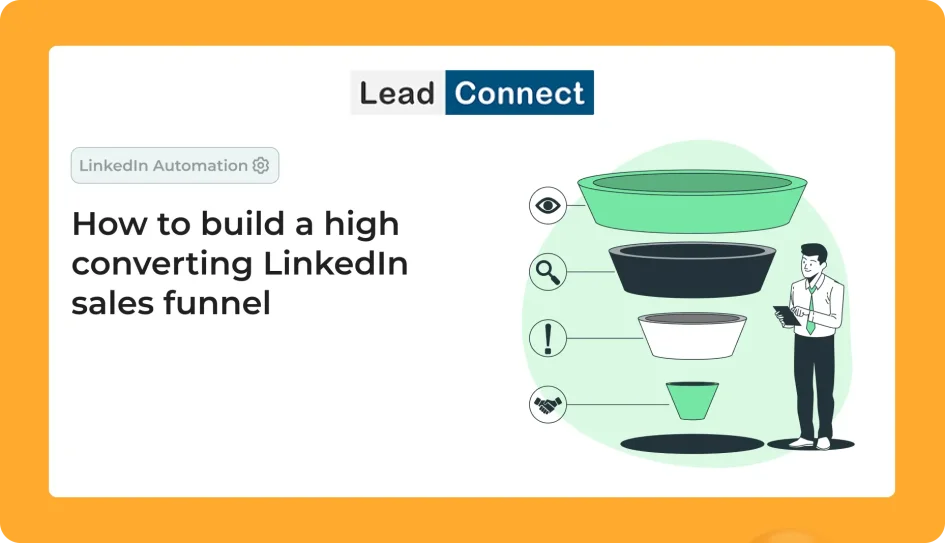
B2B sales funnels typically follow this structure:
- Awareness (Top of Funnel): Attract attention through LinkedIn posts, optimized profiles, and content strategy.
- Consideration (Middle of Funnel): Use connection requests and personalized messages to start conversations.
- Decision (Bottom of Funnel): Close deals via follow-ups, meetings, and value-driven content.
Can you automate LinkedIn outreach?
Yes, using LinkedIn automation tools, you can automate your outreach strategy while still personalizing your message to improve response rate and engagement.
Optimize Your LinkedIn Profile for Marketing Funnel Success
Before launching any automation campaign, start by optimizing your LinkedIn profile. Why? Because your profile is your landing page.
Key LinkedIn Optimization Steps:
- Headline: Include keywords that reflect your offer.
- About Section: Showcase your value proposition and lead generation capabilities.
- Banner: Use visuals that promote your B2B sales funnel or lead magnet.
- Featured Section: Highlight case studies, lead magnets, or calendar links.
- Recommendations: Build trust with social proof.
An optimized LinkedIn profile increases the chances of conversion at every stage of your sales funnel.
How to Build a High-converting Sales Funnel on LinkedIn in 5 Steps?
Let’s break down the stages of your LinkedIn funnel and how automation can support each step.
1. Define Your Target Audience
Use LinkedIn Sales Navigator to zero in on your ideal prospects by filtering based on job title, industry, company size, and more. This ensures you automate outreach to people who are actually in your funnel’s sweet spot.
2. Send Connection Requests at Scale
Instead of sending generic invites, use tools like LinkedFusion or LeadConnect to automate your connection requests with personalized message templates. These automation tools help you reach more prospects while keeping it human.
Does LinkedIn allow automation?
LinkedIn discourages spammy automation. Use trusted LinkedIn automation tools that follow safety limits and offer features like randomized delays and personalized messaging.
3. Automate Your LinkedIn Messages
After connecting, use automation to send follow-ups that nurture leads. Segment prospects by funnel stage and personalize each message accordingly. Tools like Expandi and Dripify allow you to set up message sequences that guide leads down your sales funnel.
4. Use LinkedIn Posts to Warm Up Prospects
While outreach automation works in the inbox, content marketing works on the feed. Post consistently about your expertise, client results, and pain points your solution solves. This builds trust and keeps prospects engaged while they’re in your funnel.
5. Convert with Calendars, Lead Magnets, or Demos
At the bottom of the funnel, drive prospects to take action. Use personalized messages to invite them to a free demo, download a lead magnet, or book a call. Include links in your LinkedIn messages or featured section to streamline the process.
The Role of LinkedIn Automation in Your Sales Funnel
LinkedIn automation is not about spamming; it’s about smart delegation.
Key Benefits:
- Save Time: Automate your LinkedIn tasks like sending connection requests, follow-ups, and messages.
- Boost Lead Generation: Reach 10x more prospects without losing personalization.
- Nurture Relationships: Use automation and personalization together to warm up leads.
- Streamline Workflows: Integrate tools with your CRM to automate data entry and status updates.
Best LinkedIn Automation Tools
1. LinkedFusion – Multichannel Outreach & CRM Sync
LinkedFusion is a powerful LinkedIn automation tool built specifically for B2B sales teams. It enables automated lead generation through personalized message sequences and multichannel engagement via LinkedIn and email.
Key Features:
- Automate LinkedIn connection requests and follow-ups with custom workflows
- Supports multi-channel outreach (LinkedIn + email)
- Smart inbox and CRM integrations (HubSpot, Pipedrive, Salesforce)
- Detailed campaign analytics to refine your sales funnel
- Works safely within LinkedIn’s daily limits
With LinkedFusion, you can automate your outreach, manage conversations, and track every touchpoint—all in one dashboard, allowing you to focus on closing deals.
2. LeadConnect – Simpler Automation for Targeted Campaigns
LeadConnect is ideal if you’re just getting started with LinkedIn automation. It helps users send personalized connection requests and follow-up messages based on Sales Navigator filters or manual lead lists.
Key Features:
- Send connection requests with personalized messages
- Create automated sequences for follow-ups
- Target your ideal audience using filters
- View campaign performance with actionable metrics
- Google Sheets integration to manage your outreach workflow
LeadConnect is lightweight but effective—it’s great for sales prospecting if you want to build relationships without overwhelming complexity.
3. LeadCRM – Smart Automation with Built-in Data Enrichment
LeadCRM stands out by combining LinkedIn automation with data enrichment and CRM integration. It is a Chrome extension and is the highest rated in the Chrome store. It’s designed for B2B sales professionals who want to not only automate LinkedIn outreach but also enrich prospect data and sync it to their sales pipeline.
Key Features:
- Auto-syncs LinkedIn leads to your CRM (e.g., HubSpot, Zoho, Pipedrive)
- Built-in data enrichment (fetch emails, company info, etc.)
- Automated LinkedIn workflows with message sequences
- Supports lead tracking and stage management in your sales funnel
- Helps reduce manual entry and save time
With LeadCRM, you can turn your LinkedIn profile into a powerful lead generation machine, ensuring each connection request becomes part of a larger, trackable funnel.
4. We-Connect – Cloud-Based & Safe LinkedIn Automation
We-Connect is a cloud-based LinkedIn automation software known for being user-friendly and compliant with LinkedIn safety guidelines. It’s built to automate your LinkedIn activities without violating platform policies.
Key Features:
- Drip campaigns with personalized messages
- Supports safe automation with random time delays
- Targeted outreach using standard LinkedIn or Sales Navigator
- Performance dashboard with metrics like acceptance rate and conversion rate
- No downloads needed—100% cloud-based
If your goal is to build trust while still automating at scale, We-Connect is a tool on the market that strikes a balance between automation and human-like behavior.
5. Meet Alfred – Multichannel Outreach with Team Collaboration
Meet Alfred is one of the more robust LinkedIn automation tools offering multichannel outreach via LinkedIn, email, and Twitter. It’s especially useful for agencies or larger teams looking to run multiple sales outreach campaigns simultaneously.
Key Features:
- Send automated connection requests, follow-ups, and nurture sequences
- Combine LinkedIn and email for better funnel engagement
- Built-in calendar for meeting scheduling
- Team collaboration and campaign sharing
- A/B testing for LinkedIn message optimization
Meet Alfred supports the full sales funnel on LinkedIn, from prospecting to closing, helping you use LinkedIn as a complete B2B growth engine.
Ways to Choose the Right LinkedIn Automation Tool
When deciding on the best LinkedIn automation tools for your business, consider:
- Your goals: Do you want to generate leads, nurture, or close deals?
- Your team size: Are you a solo founder or part of a large team?
- Your workflow: Do you need CRM sync, data enrichment, or multichannel outreach?
- Your budget: Tools range from affordable (LeadConnect) to premium (Meet Alfred).
Regardless of which automation tool you choose, ensure it helps you:
- Automate LinkedIn actions safely,
- Keep outreach personalized,
- And support your full b2b sales funnel.
Automate Your LinkedIn Marketing Funnel Without Losing the Human Touch
Here’s a quick example of how to automate your LinkedIn funnel while keeping it personal:
- Connection Request:
“Hi [Name], I noticed your work in [Industry] and would love to connect!”
- Follow-Up Day 1:
“Thanks for connecting! I help [job title]s like you streamline [pain point] using [solution]. Curious if that’s relevant for you?”
- Follow-Up Day 3:
“Here’s a case study on how we helped [similar company] improve [result] in 30 days: [Link]”
- Follow-Up Day 5:
“Would it make sense to explore if this could work for you, too? Here’s my calendar: [Link]”
With the right automation tool that helps you customize your workflow, you can automate your outreach without losing authenticity.
Combine LinkedIn and Email for Better Results
If you want to scale beyond LinkedIn, pair it with email outreach. Many LinkedIn automation tools allow integration with email, enabling you to reach your prospect even if they don’t reply on LinkedIn.
This multi-channel approach boosts your visibility and strengthens your funnel.
Mistakes to Avoid in LinkedIn Outreach Automation
❌ Using generic messages: Always personalize.
❌ Over-automating: Don’t forget to engage manually at key points.
❌ Ignoring content strategy: Use LinkedIn posts to stay top-of-mind.
❌ Skipping analytics: If you don’t measure, you can’t improve.
Tools That Can Help in LinkedIn Funnel Success
Besides LinkedIn automation tools, consider platforms that support your funnel end-to-end:
- CRM integrations: Sync contacts and track sales progress.
- Email warm-up tools: Ensure inbox deliverability.
- Content tools: Automate content distribution via tools like Buffer or Hootsuite.
How to build a LinkedIn funnel using these tools?
Use tools like LinkedIn automation, personalization at scale, multi-touch outreach, and sales analytics. Build trust over time and guide leads through awareness, interest, and conversion.
Conclusion
To recap, LinkedIn can significantly amplify your B2B lead generation process if you use it right. By optimizing your LinkedIn profile, automating your outreach, and personalizing your message at every stage of your funnel, you’ll generate more qualified leads, save time, and boost your conversion rate.
The right LinkedIn automation tools to help you build a high-converting LinkedIn sales funnel are out there. You just need to test, track, and refine. Whether you’re looking to automate your outreach, nurture leads, or close more deals, LinkedIn is your sales partner, not just a networking site.
Final Tip: Start small, test often, and always prioritize quality over quantity in your LinkedIn outreach automation strategy.